Refer to the link below:
Methods to find customer user exit or badi for a program

Your Alternative SAP Resource Blog
Tuesday, October 24, 2017


Saturday, May 7, 2016
How to debug SAP Standard Table
1. Go to SE16
2. Enter the Table
3. Enter the Selection Screen
4. Execute
5. Select the row that you would like to edit and click display
6. Once you are displaying the particular row, enter /h
7. Press Enter
8. In debug mode, double click on if code = 'SHOW'.
9. Change the value from show to EDIT
10. Click F8
11. You can also perform other activities like INSR, DELE
2. Enter the Table
3. Enter the Selection Screen
4. Execute
5. Select the row that you would like to edit and click display
6. Once you are displaying the particular row, enter /h
7. Press Enter
8. In debug mode, double click on if code = 'SHOW'.
9. Change the value from show to EDIT
10. Click F8
11. You can also perform other activities like INSR, DELE
Monday, October 12, 2015
Excel Functions
=COUNTIF(J2:J2,"<"&TODAY()-7)
Where J2 is the Created Date. From the example above:
Where J2 is the Created Date. From the example above:
- If the Created Date is later than 7 days, then the Excel function will return as a Red column and with value 1.
- If the Created Date is less than 7 days, then the Excel function will return as a Green column and with value 0.
Friday, June 26, 2015
MM Opening previous period
SAP Steps for Opening previous period in MM
If you want to open previous period for reversal entry or additional entry
The following are steps for Opening previous period in MM :
1. Go to TCode SU01 (see OSS NOTES 487381)
2. Choose "change" tab with your loging Name
3. Choose "Parameter" tab
give Parameters MMPI_READ_NOTE with date format as YYYYMMDD
(say today 20071201)
4. SAVE.
5. Go to T-code MMPI
6. open the old periods which you want to post into,
If you want to open previous period for reversal entry or additional entry
The following are steps for Opening previous period in MM :
1. Go to TCode SU01 (see OSS NOTES 487381)
2. Choose "change" tab with your loging Name
3. Choose "Parameter" tab
give Parameters MMPI_READ_NOTE with date format as YYYYMMDD
(say today 20071201)
4. SAVE.
5. Go to T-code MMPI
6. open the old periods which you want to post into,
Saturday, April 18, 2015
Vendor Partner Function Determination
Vendor
Partner Function Determination
1- Define Partner Schemas :
SPRO /
Materials Management / Purchasing / Partner Determination / Partner Settings in
Purchasing Documents / Define Partner Schemas
No change indicator : If you want to prevent changes in
partner defined in the vendor master record and prevent deleting partner roles,
it is set.
Mandatory indicator : Whether a partner role is mandatory
in a vendor master or PO.
Higher level indicator : If partner role does not been found
in plant or sub-range level, sap looks for partner role at purchasing
organization level. Hpwever, higher level is used process of automatic creation
PO.
End indicator : If it is set , partner role is
defaulted from vendor master when document is saved or checked. It is useful
when different data is added in the vendor at the plant/vendor subrange.
Whether all items contain same plant or subrange. Invoicing parties are not
determinated until end of document process PO so end incator might change it.
2- Define
Settings for Vendor Master Records :
SPRO / Logistics - General
/ Business Partner / Vendors / Control / Define Account Groups and Field
Selection (Vendor)
4- Allowed partner roles
You can do
with Account group : Field reference , Permitted partner roles
After that
specify partner role VN is allowed for account group ZVMU.
SPRO /
Materials Management / Purchasing / Partner Determination / Partner Roles /
Define Permissible Partner Roles per Account Group
Tuesday, March 17, 2015
TABU Transport Request for cases like OBYC update
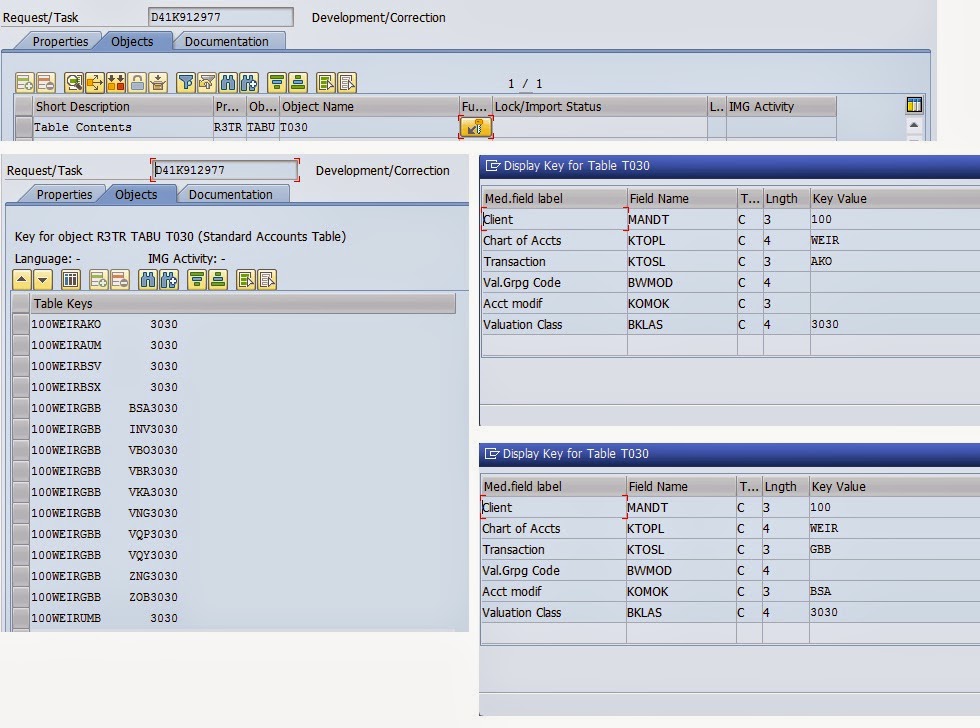
OBYC transports will by default transport the whole table, e.g. for GBB the whole list.
For the case of Factory Calendar
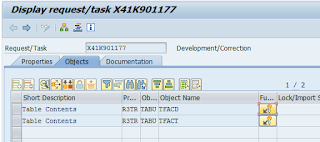
ZY in the screen below is the Factory Calendar
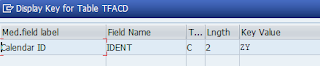
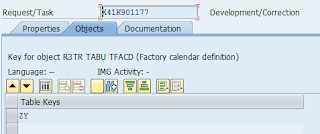
ZYE is the Factory Calendar plus English Language Key

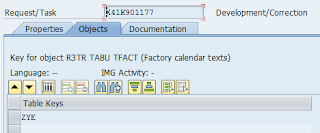
If you were to transport only selected ones, follow the following steps. These are useful in the event that multiple projects are going on, and you do not want to overwrite each other.
1. SE10
2. Create a Workbench TR
3. Click on the Task, then select Change Type to change it from Unclassified to Development/Correction
4. Enter the following details in the TR
Remember, to update the Table value, double click on the White Table key space and you will get a popup to enter the table values
5. NOTE* For Rules e.g. Debit / Credit, Object T030R is required.
Remember, to update the Table value, double click on the White Table key space and you will get a popup to enter the table values
5. NOTE* For Rules e.g. Debit / Credit, Object T030R is required.
For the case of Factory Calendar

ZY in the screen below is the Factory Calendar


ZYE is the Factory Calendar plus English Language Key


Thursday, March 5, 2015
EWM Outbound Delivery Order (ODO) Issue where Goods are issued but no Outbound Delivery (OD) document generated
EWM Outbound Delivery Order (ODO) Issue where Goods are issued but no Outbound Delivery (OD) document generated
From time to time, check the list of Outbound Delivery Orders on whether they have been Post Goods Issued completely. Completely in this matter means, Outbound Delivery (OD) are subsequently created and PPF Action "Send Message to ERP" exists. If these are not available, this means that the Goods Issued done in EWM, will stay in EWM and not communicated back to ECC.
1. Go to /n/scwm/MON
2. Get the list of Outbound Delivery Orders which have been Post Goods Issued
3. Refer to OD table /SCDL/DB_DLVI_O
4. Enter the Outbound Delivery Order number @ the REFDOCNO field. The OD document should appear in the DOCNO Field.
From time to time, check the list of Outbound Delivery Orders on whether they have been Post Goods Issued completely. Completely in this matter means, Outbound Delivery (OD) are subsequently created and PPF Action "Send Message to ERP" exists. If these are not available, this means that the Goods Issued done in EWM, will stay in EWM and not communicated back to ECC.
1. Go to /n/scwm/MON
2. Get the list of Outbound Delivery Orders which have been Post Goods Issued
3. Refer to OD table /SCDL/DB_DLVI_O
4. Enter the Outbound Delivery Order number @ the REFDOCNO field. The OD document should appear in the DOCNO Field.
Tuesday, March 3, 2015
Excel Date convert from dd.mm.yy from CSV to mm-dd-yy
Excel Date convert from dd.mm.yy from CSV to mm-dd-yy
=(MID(A1,4,2)&"/"&LEFT(A1,2)&"/"&RIGHT(A1,2))
suppose in my regions it is entered as in A1
15.11.2012 which you want to mean 15th November 2012
such entry will not be date but only a string
to convert in B1 (any empty cell) enter this formula
=(MID(A1,4,2)&"/"&LEFT(A1,2)&"/"&RIGHT(A1,2))+0
unquote
you entered date asz 15.11.2012(15th november 2012) whereas you should have entered as 11/15/12
having entered as 15.11.12 which is a string at least in my computer
I have to convert to date as 15th november 2012
so I take first mid(a1,4,2)
take the fourth item and the lengthof 2
fourth item is 1 and length2 menas 11
then I add a slash "/"
and then add left two items that is 15 and the a slash
and then last four items that is 2013.
so it will be 11/15/2012
but as you used mid left etc the final result that is 11/15/12 is also a string
something like '1234
to make it a date i have to add a zero to the whole text
then you get a date normally as a five figure number
dates are always taken as a number in excel
so you to format as date in any format
dd-mmm-yyyyy that 15-nov-2012
Sunday, December 14, 2014
Extended Warehouse Management Tables
| Function | Table | Description |
| Wave | /SCWM/WAVEHDR | Wave – Header Information |
| /SCWM/WAVEITM | Wave Item | |
| ODO | /SCDL/DB_PROCH_O | Outbound Delivery Order Header |
| /SCDL/DB_PROCI_O | Outbound Delivery Order Item | |
| OD | /SCDL/DB_DLVH_O | Outbound Delivery Header |
| /SCDL/DB_DLVI_O | Outbound Delivery Item | |
| ID | /SCDL/DB_PROCH_I | Inbound Delivery: Header |
| /SCDL/DB_PROCI_I | Inbound Delivery Item | |
| Reference | /SCDL/DB_REFDOC | Reference |
| /SCDL/DB_REQH | Header Inbound Delivery Notification / Outbound Delivery Request | |
| /SCDL/DB_REQI | Item Inbound Delivery Notification / Outbound Delivery Request | |
| Status | /SCDL/DB_STATUS | Status |
| /SCDL/V_STATUS | Generated Table for View /SCDL/V_STATUS | |
| HU | /SCWM/HUHDR | Handling unit header |
| /SCWM/HUSSTAT | Individual Status for Each Handling Unit | |
| /SCWM/HUREF | Handling Unit Reference | |
| /SCWM/HUSTOBJ | Information about HU Status Object | |
| /SCWM/GMHUSTAT | HU Status of HUs from Goods Movement Log | |
| TJ02T | Status table | |
| WT | /SCWM/ORDIM_O | Warehouse Tasks Open |
| /SCWM/ORDIM_C | Warehouse Tasks Confirmed | |
| WO | /SCWM/WHO | Warehouse Order |
| Quantity | /SCWM/AQUA | Available Quantity |
| /SCWM/QUAN | Quant Attributes | |
| /LIME/NQUAN | LIME – Stock Quantities | |
| /SCWM/STOCK_IW01 | Stock GUID from table | |
| BINS | /SCWM/LAGP | Storage Bins |
| /SCWM/LAGPS | Bins for Execution Areas and Activities | |
| PI | /LIME/PI_DOC_IT | Table of Physical Inventory Document Items |
| /LIME/PI_LOGHEAD | Log Table for Header Data of a Physical Inventory document | |
| /LIME/PI_LOGITEM/LIME/PI_DOC_TB | Log Table for Item Data of a Physical Inventory documentQuantities for Physical Inventory Document | |
| TU | /SCWM/TU_DLV | Assignment of Deliveries and HUs to Transportation Units |
| /SCWM/TU_STATUS | Status of Transportation Unit Activities | |
| /SCWM/TUNIT | TU &other GUID’s | |
| Masterdata | /SAPAPO/MATKEY | Product |
| /SAPAPO/MATMAP | Mapping Table for Products | |
| /SAPAPO/MATLWH | Location Product for Location Warehouse | |
| /SAPAPO/MATEXEC | Product: Execution Data | |
| /SAPAPO/MATLWHST | Location Product for Location Whse and Subloc. Storage Type | |
| /SAPAPO/MATTXT | Material Descriptions | |
| BP | ADRC | Addresses (Business Address Services) |
| /SCDL/DB_BPLOC | Partner/Location | |
| BUT000 | BP: General data I | |
| BUT020 | BP: Addresses |
Friday, November 21, 2014
Thursday, November 6, 2014
When the TRIM / CLEAN Function Doesn't Work
Example: Removing Non-breaking Spaces
This example will remove non-breaking spaces from a line of text using the TRIM, SUBSTITUTE, and CHAR functions.
Since the SUBSTITUTE, and CHAR functions are nested inside the TRIM function, the formula will be typed into the worksheet rather than using the functions' dialog boxes to enter the arguments.
- Copy the line of text below, which contains several non-breaking spaces between the words non-breakingand spaces, into cell D1:
Removing non-breaking       spaces in Excel
- Click on cell D3 - this is where the formula to remove those spaces will be located
- Type the following formula into cell D3:
=TRIM(SUBSTITUTE(D1,CHAR(160),CHAR(32)))
and press the Enter key on the keyboard - The line of text Removing non-breaking spaces in Excel should appear in cell D3 without the extra spaces between the words
- When you click on cell D3 the complete function appears in the formula bar above the worksheet
Thursday, October 30, 2014
Archiving Material Masters in SAP
Run the following programs in sequence:-
The first program will write the materials to be archived into a temporary log. The second program will then delete based on the temporary log generated by the first program.
Write Program

Delete Program

SAP Note 900537 Important Notes on Error Messages during Write of Archiving Material Master
Error W4001/W4005 - Purchase order exists/Purchase requistions exist:
If the purchase order items have not subsequently been processed, you can delete the purchase order items for the material and the plant.
If full goods receipt has not yet taken place for a particular purchase order item, you can reset the purchase order quantity.
If the purchase order item has been delivered in full, but not yet completely settled, you have to wait for the invoice verification function to act on this.
If a purchase order has been processed in full, you can delete the processed purchase order items using the archiving programs.
Please review note 401318 Archiving: Additional information. This note explains the criteria which must be set in purchasing documents.
Error W4004 - Info record exists:
The cause is that there are inforecords without deletion flags for the material: Branch to the transaction for setting deletion flags.
Error W4007 - Dependent storage location entries exists:
There is stock at a storage location. Reduce the stock and the archiving process should work.
Also this message could be due to dependent batches and reservations ect. at the storage level
Error W4009 - Indep. requirements exist: Please review attached note 135807 which gives you information on how to delete these requirements.
Error W4012 - Use in sales and distribution:
The error W4012 indicates that the material is used in sales and distribution, this means that there are open sales documents that exists. You must archive all existing SD documents from your system. You may check this by going to transaction VA05 and check for open sales documents, also check SE16 for the VAPMA table , VBBE table or VBBS table. Please use archiving object SD_VBAK to delete closed sales documents.
Error W4014 - Bill of material exists:
Please use CS15 and check if the material is used in any of the BOM's. If yes then please remove the respective Item. Also if the material is used in any of the BOM header then you would need to delete the entire BOM and you could use Transaction SARA with object CS_BOM for same. Also check table MAST if there any entries for that material. Note 47732 also gives some good information on the material being used in the BOM's
Error W4015 - Use in bill of material:
The material is linked to a bill of materials. Please review notes 47732 and 107109.
Error W4017 - Reservation/Dependent requirements exist:
This message indicates that some reservations exist for the material you are trying to archive. You should be able to see the existing reservations using table RESB. Firstly, you must archive the document that caused the reservation to be created, for example Production Orders then you must archive the reservations themselves. Afterwards, it should be possible to archive the material.
Note 30781 may assist if you identify that these requirements stem from purchase requisitions.
Error W4020 - WM stock transfer (from material) exists:
This error comes from a check on table LUBU (Posting change document). There is an entry for this material/Warehouse in this table these entries have to be has to be archived first using the archiving object RL_LUBU in SARA.
Error W4025 - Use in product group exists:
You have to remove the material from all product groups, to which the material is assigned. You should be able to do this in the transaction MC86. Maybe also the transaction MC91 helps to find them.
The error is also raised, if for the material and plant still a planning material is maintained in the MRP data. In this case you need to remove the assigned planning material for example using transaction MM02.
Error W4031 - Plant is assigned to the valuation area:
The material cannot be archived for this valuation area since the material is still used in dependent tables.Delete these dependencies. You can then archive the material for the valuation area.
This message is created when the MARC entry for valuation area has a check error, but there is no check error for the assigned MBEW entry.
Error W4038 - Use in routing - Inspection Plan:
For the Error W4038 you have to delete the material assignment in the CA02, but this is not enough, because the entries in the database still exist. That means, that you activity in the CA02 has only set the deletion flag, nothing more. To really archive this entries you should use the archiving object PM_PLAN('Routings'), where the still existing entries are archived.
Error W4039 - Routing exists:
Please consult note 60386
Error W4068 - Source list entries exist:
This message is issued, if source list entries exist in database table EORD. You have to change the validity to a day before the archiving date or to set the 'Blocked'-indicator for the entries by transaction ME01 to avoid this error message.
Error W4077 - Delivery exists:
For message W4 077 you have to archive existing deliveries before with archiving object SD_LIKP or RV_LIKP. This are also data, which has to be archived before the material itself.
Error W4080 - Costing data exists:
You will need to archive and delete the cost estimates before you are able to archive the material master.
Check in transaction SE16:
(1) table MBEW select material, remember KALNR / KALN1.
(2) table KEKO select KEKO-KALNR by MBEW-KALNR and MBEW-KALN1.
(3) table KANZ select KANZ-KALNR_MAT/-KALNR_TOP by MBEW-KALNR and KALN1
If you find entries in KEKO or KANZ archiving material master will not be sucessful (message W4080).
The material has to be marked for deletion first (TA MM06). Then all assigned cost estimates have to be archived (transaction CKR3 or SARA ->CO_COPC). When KEKO and KANZ entries disappeared, archive material.
Please refer to note 547867 for more information.
Error W4092 / W4096 - Sales order stock records exist / Dependent sales
order stock records (totals) exist:
Sales order stock exist. Sales order stock are special stocks, which are not stored in table MARD. You have to remove existing stocks before and also to archive all special stocks, before you could archive the material. You should use the archiving object MM_SPSTOCK to do this.
Error W4097 - Dependent batch records exist:
The error messages that are raised indicate the following must be performed for the process to be successful. You can find the existing batch via transaction SE16 on table MCHA by entering the material number and hitting [execute].
1. remove/transfer the stock that currently resides in the prior period
for the material/plant/sloc.
2. Set the batch deletion flag using txn MSC2N for material within the
plant.
3. Execute SARA for archiving object MM_SPSTOCK and check the spool file for errors. If errors still exist, one of the above steps was not performed properly. If no error exist, proceed to archive the material/plant using txn SARA for archiving object MM_MATNR as you did previously.
Error W4100 - Dependent special stocks at the vendor exist:
Please perform archive for special stock first via transaction code SARA for MM_SPSTOCK. Entries are found in table MSSL and MSLB.
Error W4102 - Use in the product catalog
The entry in table WLBM has to be deleted. Please check the base layout area of the product catalogues.
Error W4107 - Internal use of the material:
First, error message W4 107 indicates that the material is used as an internal material for another material. Go to table MARA for this material and check fields BMATN and MFRPN.
Please call the function 'MG_BEZUG_MARA_CHECK' with the material and it should give you back a flag, if article is used or not
Also it can be possible that the material is used in table fields
MARA-PMATA
MARA-PMATN
MARC-NFMAT
MARC-STDPD
MARA-BMATN
MVKE-PMATN
Error W4114 - Material is used in control cycles
If the material is used in non-WM-managed storage locations, then you need to delete the KANBAN control cycles using transaction PK02. You can determine using transaction PK18 the KANBAN control cycles for the material and storage location, and check whether the KANBAN control cycles can be deleted.
If the material is used in WM-managed storage locations, then you need to delete the WM control cycles using transaction LPK2. You can determine using transaction LS41 the WM control cycles for the material and storage location, and check whether the WM control cycles can be deleted.
Error W4119 - Stock value for previous year/year before last still exists:
Apply notes 392078 and 580664.
After the implementation of this correction, it is not possible to delete the accounting data (Table MBEW) of a material when the stock value is not equal to zero in the previous year. You can only delete the material if the valuated stock is directly booked out in the previous year through a material credit (Transaction MR22) or a price change (Transaction MR21). If postings in the previous year are no longer possible, you will have to wait until the next annual displacement in order to delete the material.
Error W4123 - Material is used in inspection lots:
Please see notes 545168 and 364582.
Error W4125 - Other dependent data exists:
Please implement note 688297.
Also this message can be raised by any implementation of the BAdI BADI_MM_MATNR, so please check all your active implementations. For your own implementations you should use the note 619015 to get specific check error messages instead message W4 125.
Message W4131 - Valuation area is assigned to the plant: This is just a warning and you should be able to archive through once these errors are removed. Messages with red light are error Whereas any message with yellow are only warning and should not stop the processing. This message is created when the MARC entry for valuation area is ok, but there is a check error for the assigned MBEW entry.
Error W4134 - Dependent material master data still exists:
Please refer note 561972. Also delete the routings / BOMs / PO for these Materials.
And for more information how to carry out archiving, please look at the online documentation under:
Cross Application components -> CA Application Data Archiving -> CO - Controlling -> Archiving Material Cost Estimates.
Please also look at the website:
http://help.sap.com/saphelp_47x200/helpdata/en/8d/3e59bc462a11d189000000e8323d3a/frameset.htm
Program
|
Function
|
MMREO050N
|
Write
|
MMREO110N
|
Delete
|
The first program will write the materials to be archived into a temporary log. The second program will then delete based on the temporary log generated by the first program.
Write Program
Delete Program
SAP Note 900537 Important Notes on Error Messages during Write of Archiving Material Master
Error W4001/W4005 - Purchase order exists/Purchase requistions exist:
If the purchase order items have not subsequently been processed, you can delete the purchase order items for the material and the plant.
If full goods receipt has not yet taken place for a particular purchase order item, you can reset the purchase order quantity.
If the purchase order item has been delivered in full, but not yet completely settled, you have to wait for the invoice verification function to act on this.
If a purchase order has been processed in full, you can delete the processed purchase order items using the archiving programs.
Please review note 401318 Archiving: Additional information. This note explains the criteria which must be set in purchasing documents.
Error W4004 - Info record exists:
The cause is that there are inforecords without deletion flags for the material: Branch to the transaction for setting deletion flags.
Error W4007 - Dependent storage location entries exists:
There is stock at a storage location. Reduce the stock and the archiving process should work.
Also this message could be due to dependent batches and reservations ect. at the storage level
Error W4009 - Indep. requirements exist: Please review attached note 135807 which gives you information on how to delete these requirements.
Error W4012 - Use in sales and distribution:
The error W4012 indicates that the material is used in sales and distribution, this means that there are open sales documents that exists. You must archive all existing SD documents from your system. You may check this by going to transaction VA05 and check for open sales documents, also check SE16 for the VAPMA table , VBBE table or VBBS table. Please use archiving object SD_VBAK to delete closed sales documents.
Error W4014 - Bill of material exists:
Please use CS15 and check if the material is used in any of the BOM's. If yes then please remove the respective Item. Also if the material is used in any of the BOM header then you would need to delete the entire BOM and you could use Transaction SARA with object CS_BOM for same. Also check table MAST if there any entries for that material. Note 47732 also gives some good information on the material being used in the BOM's
Error W4015 - Use in bill of material:
The material is linked to a bill of materials. Please review notes 47732 and 107109.
Error W4017 - Reservation/Dependent requirements exist:
This message indicates that some reservations exist for the material you are trying to archive. You should be able to see the existing reservations using table RESB. Firstly, you must archive the document that caused the reservation to be created, for example Production Orders then you must archive the reservations themselves. Afterwards, it should be possible to archive the material.
Note 30781 may assist if you identify that these requirements stem from purchase requisitions.
Error W4020 - WM stock transfer (from material) exists:
This error comes from a check on table LUBU (Posting change document). There is an entry for this material/Warehouse in this table these entries have to be has to be archived first using the archiving object RL_LUBU in SARA.
Error W4025 - Use in product group exists:
You have to remove the material from all product groups, to which the material is assigned. You should be able to do this in the transaction MC86. Maybe also the transaction MC91 helps to find them.
The error is also raised, if for the material and plant still a planning material is maintained in the MRP data. In this case you need to remove the assigned planning material for example using transaction MM02.
Error W4031 - Plant is assigned to the valuation area:
The material cannot be archived for this valuation area since the material is still used in dependent tables.Delete these dependencies. You can then archive the material for the valuation area.
This message is created when the MARC entry for valuation area has a check error, but there is no check error for the assigned MBEW entry.
Error W4038 - Use in routing - Inspection Plan:
For the Error W4038 you have to delete the material assignment in the CA02, but this is not enough, because the entries in the database still exist. That means, that you activity in the CA02 has only set the deletion flag, nothing more. To really archive this entries you should use the archiving object PM_PLAN('Routings'), where the still existing entries are archived.
Error W4039 - Routing exists:
Please consult note 60386
Error W4068 - Source list entries exist:
This message is issued, if source list entries exist in database table EORD. You have to change the validity to a day before the archiving date or to set the 'Blocked'-indicator for the entries by transaction ME01 to avoid this error message.
Error W4077 - Delivery exists:
For message W4 077 you have to archive existing deliveries before with archiving object SD_LIKP or RV_LIKP. This are also data, which has to be archived before the material itself.
Error W4080 - Costing data exists:
You will need to archive and delete the cost estimates before you are able to archive the material master.
Check in transaction SE16:
(1) table MBEW select material, remember KALNR / KALN1.
(2) table KEKO select KEKO-KALNR by MBEW-KALNR and MBEW-KALN1.
(3) table KANZ select KANZ-KALNR_MAT/-KALNR_TOP by MBEW-KALNR and KALN1
If you find entries in KEKO or KANZ archiving material master will not be sucessful (message W4080).
The material has to be marked for deletion first (TA MM06). Then all assigned cost estimates have to be archived (transaction CKR3 or SARA ->CO_COPC). When KEKO and KANZ entries disappeared, archive material.
Please refer to note 547867 for more information.
Error W4092 / W4096 - Sales order stock records exist / Dependent sales
order stock records (totals) exist:
Sales order stock exist. Sales order stock are special stocks, which are not stored in table MARD. You have to remove existing stocks before and also to archive all special stocks, before you could archive the material. You should use the archiving object MM_SPSTOCK to do this.
Error W4097 - Dependent batch records exist:
The error messages that are raised indicate the following must be performed for the process to be successful. You can find the existing batch via transaction SE16 on table MCHA by entering the material number and hitting [execute].
1. remove/transfer the stock that currently resides in the prior period
for the material/plant/sloc.
2. Set the batch deletion flag using txn MSC2N for material within the
plant.
3. Execute SARA for archiving object MM_SPSTOCK and check the spool file for errors. If errors still exist, one of the above steps was not performed properly. If no error exist, proceed to archive the material/plant using txn SARA for archiving object MM_MATNR as you did previously.
Error W4100 - Dependent special stocks at the vendor exist:
Please perform archive for special stock first via transaction code SARA for MM_SPSTOCK. Entries are found in table MSSL and MSLB.
Error W4102 - Use in the product catalog
The entry in table WLBM has to be deleted. Please check the base layout area of the product catalogues.
Error W4107 - Internal use of the material:
First, error message W4 107 indicates that the material is used as an internal material for another material. Go to table MARA for this material and check fields BMATN and MFRPN.
Please call the function 'MG_BEZUG_MARA_CHECK' with the material and it should give you back a flag, if article is used or not
Also it can be possible that the material is used in table fields
MARA-PMATA
MARA-PMATN
MARC-NFMAT
MARC-STDPD
MARA-BMATN
MVKE-PMATN
Error W4114 - Material is used in control cycles
If the material is used in non-WM-managed storage locations, then you need to delete the KANBAN control cycles using transaction PK02. You can determine using transaction PK18 the KANBAN control cycles for the material and storage location, and check whether the KANBAN control cycles can be deleted.
If the material is used in WM-managed storage locations, then you need to delete the WM control cycles using transaction LPK2. You can determine using transaction LS41 the WM control cycles for the material and storage location, and check whether the WM control cycles can be deleted.
Error W4119 - Stock value for previous year/year before last still exists:
Apply notes 392078 and 580664.
After the implementation of this correction, it is not possible to delete the accounting data (Table MBEW) of a material when the stock value is not equal to zero in the previous year. You can only delete the material if the valuated stock is directly booked out in the previous year through a material credit (Transaction MR22) or a price change (Transaction MR21). If postings in the previous year are no longer possible, you will have to wait until the next annual displacement in order to delete the material.
Error W4123 - Material is used in inspection lots:
Please see notes 545168 and 364582.
Error W4125 - Other dependent data exists:
Please implement note 688297.
Also this message can be raised by any implementation of the BAdI BADI_MM_MATNR, so please check all your active implementations. For your own implementations you should use the note 619015 to get specific check error messages instead message W4 125.
Message W4131 - Valuation area is assigned to the plant: This is just a warning and you should be able to archive through once these errors are removed. Messages with red light are error Whereas any message with yellow are only warning and should not stop the processing. This message is created when the MARC entry for valuation area is ok, but there is a check error for the assigned MBEW entry.
Error W4134 - Dependent material master data still exists:
Please refer note 561972. Also delete the routings / BOMs / PO for these Materials.
And for more information how to carry out archiving, please look at the online documentation under:
Cross Application components -> CA Application Data Archiving -> CO - Controlling -> Archiving Material Cost Estimates.
Please also look at the website:
http://help.sap.com/saphelp_47x200/helpdata/en/8d/3e59bc462a11d189000000e8323d3a/frameset.htm
Subscribe to:
Posts (Atom)